This guide explores the integration of the Mpx5700dp sensor with Arduino systems, a critical step in modern sensor technology applications. The Mpx5700dp pressure sensor, renowned for its accuracy and reliability, offers diverse applications in data logging, mobile robotics, and environment monitoring. Arduino's flexibility and ease of use makes it an excellent platform for leveraging the sensor’s capabilities.
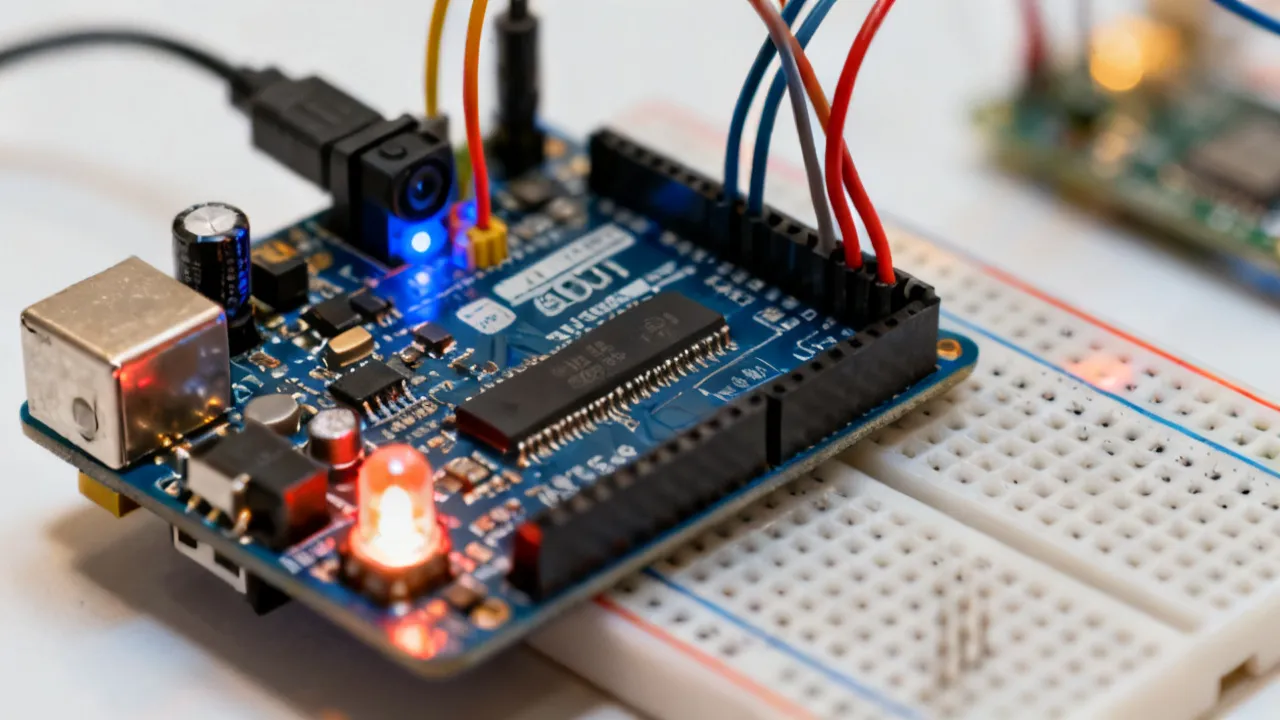
Sensor technology has dramatically transformed how we interact with and understand our surroundings, providing new insights and capabilities that influence everything from daily life to complex industrial processes. The Mpx5700dp sensor, with its precision and versatility, is at the forefront of this evolution. Specifically designed to measure differential pressure, it enables accurate pressure differentials in various contexts, including fluid dynamics, environmental monitoring, and industrial automation. Arduino, on the other hand, serves as an accessible and user-friendly platform for innovators and enthusiasts alike to create interactive projects and prototypes. Combining these two technologies opens a world of possibilities for both professional and hobbyist applications, allowing for sophisticated experiments and data collection in an intuitive way.
The Mpx5700dp sensor has become a favorite in the tech community for several reasons. One of its standout features is its reliable performance under various conditions; it is capable of accurately measuring pressures as high as 700 kPa, which makes it particularly suitable for demanding environments where precision is critical. Moreover, the sensor provides a straightforward integration process with microcontrollers like Arduino, making it accessible to users at all skill levels. Another significant benefit is its high sensitivity and low drift characteristics, which grant it an edge for applications requiring rigorous data logging and real-time monitoring. These features make the Mpx5700dp an excellent choice whether you're working on simple DIY projects, complex engineering systems, or academic research.
Arduino is not just a simple microcontroller; it has evolved into a versatile platform that combines hardware and software into an open-source ecosystem that supports various applications. The Arduino community has created extensive libraries and resources that can significantly shorten development time for new projects. Its straightforward programming interface permits users to control inputs and outputs based on programmed instructions, allowing for customizations that cater to specific needs. When integrating sensors like the Mpx5700dp, Arduino acts as the central processing hub that collects data, processes it, and relays it to the user, either through a display or a data logging system. This synergy between Arduino and sensors like the Mpx5700dp removes the complexity from the project development process, enabling individuals and teams to focus on innovation and application.
This step-by-step guide outlines how to successfully combine the Mpx5700dp sensor with Arduino:
| Step | Description |
|---|---|
| 1. Gather Materials | Acquire an Mpx5700dp sensor, an Arduino board (such as the Arduino Uno), several connecting wires, and a breadboard. It's also recommended to have a power supply, resistor, and a multimeter for more accurate setup and testing. |
| 2. Set Up Hardware | Begin by connecting the Mpx5700dp sensor to the Arduino using the breadboard. The sensor has four pins: Vcc (power), GND (ground), OUT (output), and a reference pin for the measurement. Ensure proper pin alignment to facilitate correct data transmission. |
| 3. Code the Arduino | Writing a script in the Arduino IDE is crucial. Start by including the necessary libraries for smooth sensor data acquisition. You may need libraries that support analog reading and serial communication. Define the necessary variables and setup your loop for reading data. |
| 4. Test the Setup | Upload your code to the Arduino and use the serial monitor to check the output. Ensure that the sensor reads consistent data and that the values are reasonable for your testing environment. |
| 5. Calibrate | Verify the sensor's accuracy by comparing its readings with a known value, such as a calibrated manometer or another pressure source. Adjust the code to fine-tune the output to match known values, ensuring accurate readings for your applications. |
The integration of Arduino with the Mpx5700dp pressure sensor finds myriad applications across various industries. In the field of automation, these systems offer precise environment monitoring, which is crucial for maintaining optimal operational conditions in manufacturing processes. For example, the combination is used in HVAC systems to monitor and control air pressures, ensuring efficient functioning and reducing energy consumption.
In the automotive and aeronautical sectors, differential pressure measurements gained from the Mpx5700dp enhance system efficiency and safety monitoring. Many modern vehicles utilize pressure sensors for various applications, including optimizing fuel efficiency by monitoring air intake and exhaust systems. Similarly, aircraft rely on accurate pressure readings for altitude calculations and engine performance evaluations.
Environmental monitoring is another pivotal area where these combined technologies stand out. The ability to measure and analyze airflow and fluid dynamics plays a significant role in studies related to climate change, pollution control, and resource management. For instance, scientists and researchers can deploy these systems to monitor water levels in reservoirs or analyze atmospheric pressure variations, subsequently impacting both industry standards and scientific research advancements.
Moreover, the medical field has emerged as a critical beneficiary of pressure sensor technology, particularly in monitoring vital signs and enhancing patient care. Differential pressure sensors such as the Mpx5700dp can be integrated into healthcare devices to measure blood pressure with high precision or monitor respiratory systems, allowing for better diagnosis and treatment plans.
Q1: What makes Mpx5700dp ideal for use with Arduino?
A1: The Mpx5700dp's low power consumption and high accuracy are complemented by Arduino’s adaptable software environment, providing a user-friendly experience for effective data collection and processing. The sensor is designed to operate in a wide range of environmental conditions, making it versatile for diverse applications.
Q2: Are there specific Arduino models best suited for the Mpx5700dp?
A2: While any standard Arduino board, such as the Arduino Uno, Nano, or Mega, can efficiently integrate with the Mpx5700dp, boards with higher clock speed and increased memory will improve performance in complex applications that require more extensive data processing capabilities.
Q3: Can the integration be expanded to include wireless capabilities?
A3: Yes, you can expand the integration by incorporating wireless components like Bluetooth or Wi-Fi modules (such as ESP8266) that allow for remote data transmission. By doing so, you enhance the project’s application scope, enabling real-time monitoring and control from mobile devices or computers, which can be advantageous for remote sensing projects or IoT applications.
Q4: How can I visualize the data collected by the Arduino and Mpx5700dp?
A4: There are various ways to visualize the data from your Arduino setup. You can utilize software like the Arduino Serial Plotter, which allows you to visualize data in real-time. Additionally, for more complex visualizations, you could use tools like Processing, MATLAB, or even online platforms like ThingSpeak or Blynk to create interactive dashboards.
Q5: What other sensors can complement the Mpx5700dp in various applications?
A5: Other sensors that can complement the Mpx5700dp include temperature sensors (like the DHT11 or LM35), humidity sensors (DHT22), and flow sensors. Using various sensors together can lead to enriched data for applications such as climate control systems, where pressure, temperature, and humidity need to be monitored simultaneously for optimal system performance.
Q6: What precautions should I take when working with the Mpx5700dp sensor?
A6: When working with the Mpx5700dp, ensure that the operating conditions do not exceed the recommended specifications, including voltage limits and pressure ranges. Additionally, take care when connecting and disconnecting wiring to avoid short circuits. If the sensor is exposed to harsh conditions, consider using protective casing to prevent damage.
The integration of the Mpx5700dp pressure sensor with Arduino exemplifies the innovative merger of precise sensor technology and flexible microcontroller platforms. This combination not only enhances the capability for real-time data collection but also drives various industries toward smarter and more efficient solutions. As industries continue to prioritize responsive, accurate measurements and data processing, tools like the Mpx5700dp and Arduino will remain crucial in driving technological advancements and innovation. From environmental monitoring to medical applications and automotive systems, the future potential of this integration is vast, making it an excellent area for exploration and development by both hobbyists and professionals alike.
The journey does not end here. As technology progresses, further integration possibilities between different sensors and microcontrollers will emerge, offering richer, more comprehensive data solutions to address real-world challenges. Whether you’re a student, engineer, or an electronics enthusiast, diving deeper into projects involving the Mpx5700dp and Arduino will only expand your skills and understanding of today's technological landscape.
To continue your exploration into the world of sensor technology and microcontrollers, here are some suggested resources:
Embrace the potential of the Mpx5700dp and Arduino to transform concepts into actionable projects that can contribute to advancements in technology and real-world solutions.
Striking the Perfect Balance: Navigating Premiums and Out-of-Pocket Expenses in Senior Insurance Plans

Explore the Tranquil Bliss of Idyllic Rural Retreats

How to Make Lasting Memories at Disneyland Attractions

4rkojvsx Technology: Industry Insights and Buying Guide

Affordable Phones and Plans for Seniors

Affordable Full Mouth Dental Implants Near You

Unlock the Top Kept Secrets to Finding Your Ideal Dentist for Flawless Dental Implant Results!

Discovering Springdale Estates

Unveiling RS Sul Telecom Services

Unveiling RS Sul Telecom Services
RS Sul Telecom emerges as a prominent entity in the telecommunications industry, providing reliable services across various regions. This article delves into the offerings of RS Sul Telecom, the benefits it presents to both individual and business clients, and its impact on the modern telecom landscape.

Understanding Rlock Advpl in Business
Rlock Advpl represents a pivotal advancement in business software solutions, offering enhanced security and efficiency for enterprise resource planning systems. This article delves into the intricacies of Rlock Advpl, its application in modern businesses, and the benefits it offers in streamlining operations and safeguarding data. As an expert tool, Rlock Advpl is essential for businesses looking to optimize their IT infrastructure.

Unveiling Atranet Innovation
Atranet represents a cutting-edge concept in networking technology. Harnessing its capabilities can transform digital communication by providing seamless connectivity. Designed to optimize data transfer, security, and efficiency, Atranet is shaping the future of how we connect and share information. This article delves into its structure, applications, and potential impacts on industry practices and consumer experiences.

Understanding Polysulfide Adhesive Applications
This comprehensive guide explores the applications and benefits of polysulfide adhesive, highlighting its unique properties and widespread use in construction, aerospace, and automotive industries. Known for its flexibility and resistance to various environmental factors, polysulfide adhesive is a key component in sealing and bonding applications, providing durability and reliability in demanding conditions.
Comparing Vtex with Salesforce Commerce
This article provides an in-depth comparison between Vtex and Salesforce Commerce, two leading digital commerce platforms. Each offers unique features suited to different business needs. Vtex is renowned for its collaborative commerce approach, while Salesforce Commerce shines with its comprehensive customer relationship management capabilities. Explore their differences, strengths, and insights from industry experts.

Understanding the Latest Chrome Version
This article delves into the intricacies and features of the latest Chrome version. Chrome, developed by Google, is one of the very popular web browsers globally, known for its speed, simplicity, and security features. Each update aims to enhance user experience through improved functionality and performance. Understanding these updates is crucial for both everyday users and developers.
